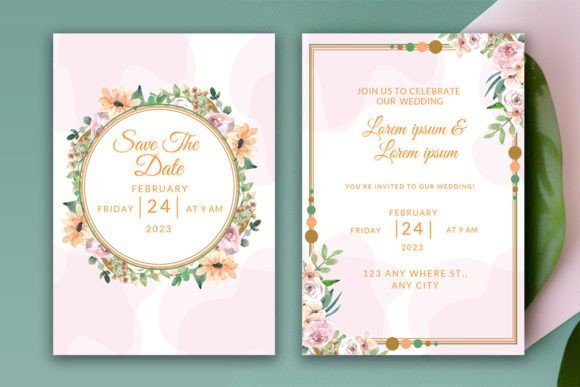
Creating the Perfect Floral Invitation: A Guide to Customizable Digital Templates
When planning a significant life event, such as a wedding or a milestone birthday party, the invitation card serves as the first tangible impression of your celebration. It sets the tone, reflects the aesthetic theme, and builds anticipation among your guests. In an era where digital convenience meets artistic expression, floral decorative invitation cards have become a timeless choice for those seeking elegance and warmth. However, designing these cards from scratch can be daunting for many. This is where customizable digital templates come into play, offering a seamless blend of professional design and personal touch.
This article explores the benefits of using editable floral invitation templates, specifically focusing on versatile formats like Canva and Adobe Illustrator. We will guide you through the process of transforming a simple digital file into a stunning, personalized piece of stationery that perfectly captures the essence of your special occasion.
The Allure of Floral Design in Event Stationery
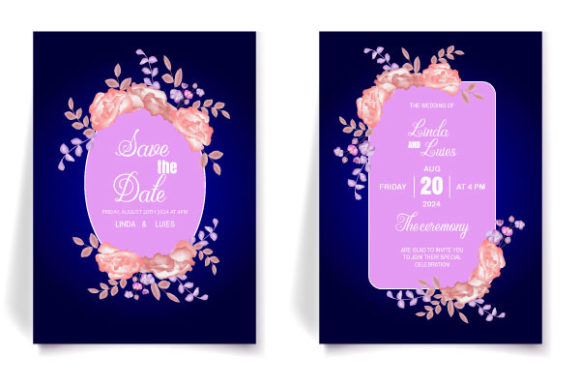
Floral motifs are perennial favorites in the world of event design. Whether it is a romantic garden wedding, a vibrant summer birthday bash, or an elegant anniversary dinner, flowers symbolize growth, beauty, and new beginnings. A floral background illustration adds depth and texture to an invitation, creating an inviting atmosphere even before the guest opens the envelope.
Modern floral designs range from delicate watercolor blooms to bold, graphic botanical prints. By choosing a template with handwritten fonts paired with these intricate floral elements, you achieve a balance between sophistication and approachability. The handwritten style adds a personal, human touch, making the invitation feel less like a corporate announcement and more like a heartfelt request for companionship in your joyous moment.
Why Choose Editable Digital Templates?
Gone are the days when you had to hire an expensive graphic designer or spend weeks waiting for print shops to deliver proofs. Today, DYI (Do-It-Yourself) printable and editable templates empower individuals to create professional-grade designs at home. Here is why this approach is gaining popularity:
- Cost-Effectiveness: Purchasing a single digital template is significantly cheaper than commissioning custom artwork or paying for premium printing services upfront.
- Total Customization: You have full control over every element. Change the text, adjust the colors to match your wedding palette, or swap out specific flowers to align with your seasonal theme.
- Speed and Convenience: With instant digital downloads, you can start editing immediately after purchase. This is ideal for last-minute changes or quick turnaround times.
- Reusability: Many templates allow you to save the edited files for future use, such as thank-you notes, save-the-dates, or subsequent events.
Understanding the Technical Formats: Canva vs. Adobe Illustrator
One of the most common questions potential buyers face is which software to use. Most high-quality floral invitation packages offer versatility by including files compatible with both Canva and Adobe Illustrator. Understanding the difference helps you choose the right tool for your skill level.
The Canva Advantage for Beginners
Canva is a web-based graphic design platform known for its user-friendly interface. It requires no prior design experience, making it perfect for beginners. If you opt for a template that includes a "PDF CANVA" file, you are essentially getting a guided tour into the world of digital design.
- Accessing the Template: Upon downloading your zipped file, you will find a PDF document containing instructions and a direct link to the Canva template.
- Account Setup: Click the link and sign up for a free Canva account if you do not already have one. While Canva offers paid Pro features, the free version is often sufficient for basic customization.
- Editing Process: Once inside the editor, you can click on any text box to change the font, color, or wording. You can also drag and drop elements, resize images, and adjust the layout with ease.
- Printing Options: After finalizing your design, you can download the file in various formats (PDF, PNG, or JPEG) to print at home or upload to a professional printing service. Canva also offers integrated printing services if you prefer a hassle-free delivery.
Adobe Illustrator for Advanced Users
For those with existing design skills or access to Adobe Creative Cloud, the inclusion of AI, EPS, and PDF vector files provides greater precision. Vector files are resolution-independent, meaning they can be scaled to any size without losing quality. This is crucial if you plan to print large banners or posters alongside your invitations. Editing in Illustrator allows for more granular control over curves, layers, and complex graphical elements.
Step-by-Step Guide to Using Your Floral Template
To ensure you get the best results from your 5” x 7” (12.7×17.8 cm) invitation template, follow this streamlined workflow:
1. Preparation and Download
After purchasing the template, you will receive a zipped file containing all necessary assets. Extract the folder and locate the instruction PDF. Verify that your computer has the necessary software installed—either the Canva browser extension/app or Adobe Illustrator.
2. Personalization
Open the template and begin editing. Start with the text fields. Replace placeholder names with your own details. Pay attention to the hierarchy of information: the names of the hosts or couple should be prominent, followed by the date, time, and venue. Use the handwritten fonts included in the template for headers to maintain the aesthetic, but consider using a clean sans-serif font for logistical details to ensure readability.
3. Color and Style Adjustments
Customize the color palette to match your event’s theme. If your wedding colors are sage green and gold, adjust the floral elements accordingly. Most modern templates allow you to select entire color groups with a single click, simplifying this process.
4. Final Review and Export
Before finalizing, proofread everything twice. Check for typos, incorrect dates, or misaligned text. Once satisfied, export the file. For printing, a high-resolution PDF is usually recommended. For digital sharing via email or social media, a PNG or JPEG file is appropriate.
Common Misconceptions About DIY Invitations
Despite the ease of use, some readers may hesitate to try digital templates due to common misconceptions:
Misconception 1: "DIY looks cheap."
Reality: A well-designed template, when customized thoughtfully, looks indistinguishable from professionally designed stationery. The key lies in choosing high-quality paper if printing physically, and ensuring your digital exports are high-resolution.
Misconception 2: "I need advanced design skills."
Reality: Platforms like Canva are built for everyone. The learning curve is minimal, and the pre-designed layouts handle the heavy lifting of composition and balance. You only need to focus on content and minor tweaks.
Misconception 3: "Digital files aren't permanent."
Reality: When you download the final edited file, it is saved to your device. You can store it in the cloud for years and reprint it whenever needed, whether for a re-print run or a different event entirely.
Practical Tips for Printing and Distribution
Once your floral decorative invitation is ready, the next step is production. If you are printing at home, ensure your printer supports the weight of the paper you choose. Cardstock between 80lb and 110lb is ideal for a premium feel. If you are using a professional printing service, always request a physical proof before running the full batch to check for color accuracy and alignment.
For digital invitations, consider sending them via email or messaging apps. Ensure the file size is optimized so it loads quickly on recipients' devices. You can also embed links to RSVP pages or event websites directly in the digital version.
Support and Troubleshooting
We understand that technology can sometimes present unexpected challenges. Whether you encounter issues opening the AI/EPS files, need help linking the Canva template, or require assistance with formatting, support is available. If you experience any difficulties during the editing process, please contact the seller. Most creators are happy to assist with technical queries to ensure you have a smooth experience.
Conclusion
Creating beautiful, personalized invitations does not have to be a stressful ordeal. By leveraging customizable digital templates featuring floral backgrounds and handwritten fonts, you can produce stunning results that reflect your unique style. Whether you choose the simplicity of Canva or the precision of Adobe Illustrator, the end result is a memorable invitation that sets the stage for your special day. Embrace the flexibility of digital design, enjoy the creative process, and share your joy with loved ones in a way that feels authentically yours.