Decorative Glitter Patterns for Creative Projects
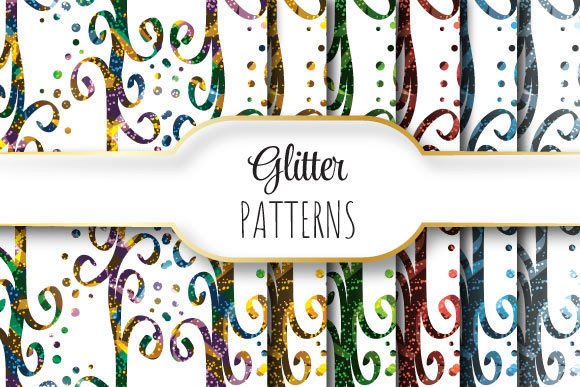
Adding a touch of sparkle to digital designs or print materials can instantly elevate the visual appeal of your work. Decorative Glitter Patterns offer a versatile solution for creators looking to add texture, depth, and festive energy to their projects without the mess of physical glitter. Whether you are designing a birthday invitation, a social media banner, or a product packaging mockup, these seamless repeating patterns provide a professional finish that captures attention.
The specific set we are discussing here is designed with precision in mind. Each file is sized at 12 x 12 inches (3600 x 3600 pixels) at a high resolution of 300dpi. This ensures that whether you are printing on standard paper or scaling up for larger formats, the quality remains crisp and clear. The package includes both vector and raster formats, giving you maximum flexibility in how you use them.
Why Choose Seamless Repeating Glitter Patterns?
One of the most significant advantages of using seamlessly repeating glitter patterns is efficiency and consistency. Unlike placing individual glitter elements one by one, which can be time-consuming and prone to uneven spacing, a seamless pattern tiles perfectly. This means you can fill an entire background, a border, or a shape with a uniform, continuous layer of sparkle.
This feature is particularly valuable for:
- Backgrounds: Create immersive backdrops for websites, blog headers, or digital wallpapers.
- Text Overlays: Apply the pattern as a texture inside text shapes for eye-catching headlines.
- Packaging Design: Use it to simulate foil stamping or glitter effects on labels and boxes.
- Invitations and Cards: Add a celebratory feel to events like weddings, holidays, and anniversaries.
For small business owners and entrepreneurs, these patterns can help differentiate brand assets. A well-designed glitter accent can convey luxury, fun, or celebration, depending on the color palette and density of the pattern. It allows even those with limited graphic design experience to achieve a polished look.
Understanding the File Specifications
When downloading creative assets, understanding the technical specifications is crucial for ensuring compatibility with your software and workflow. This particular collection is provided in a convenient zip file containing one EPS file and six JPEG files. Let’s break down what each format offers and why it matters.
The Power of EPS 10 Format
The included EPS 10 file is a vector-based format. Vector graphics are defined by mathematical equations rather than pixels, which means they can be scaled to any size without losing quality. This is ideal if you need to stretch a pattern across a large billboard or shrink it down for a tiny icon. You can edit the colors, adjust the opacity, and manipulate the elements within compatible software like Adobe Illustrator or Inkscape.
Using the EPS file also allows for greater control over the final output. If you want to change the hue of the glitter from gold to silver, or adjust the transparency to make it subtle rather than overwhelming, the vector format gives you that freedom. It is the go-to choice for professional print production where clean edges and scalability are non-negotiable.
Convenience of High-Resolution JPEGs
In addition to the vector file, the package includes six JPEG files. These are raster images, meaning they are made up of pixels. However, because they are exported at 3600 x 3600 pixels and 300dpi, they are considered high-resolution. This makes them perfect for immediate use in programs like Photoshop, Canva, GIMP, or Microsoft Word.
JPEGs are universally supported and easy to drag-and-drop into almost any design project. They are particularly useful for quick edits, such as adding a drop shadow, applying a blur effect, or compositing with other photographic elements. Having both formats in one zip file means you don’t have to worry about compatibility issues; you can choose the format that best suits your current task.
Practical Applications for Different Users
The versatility of Decorative Glitter Patterns makes them suitable for a wide range of users. Here is how different groups can benefit from this resource:
Beginners and Hobbyists
If you are just starting out in crafting or digital design, these patterns remove the guesswork. You do not need advanced skills to create a beautiful background. Simply insert the JPEG into your preferred app, resize it to fit your canvas, and let it do the heavy lifting. It is a great way to learn composition and color theory by experimenting with how the glitter interacts with other elements.
Bloggers and Content Creators
Visual content is key to engaging audiences online. Bloggers can use these patterns for featured images, Pinterest pins, or newsletter headers. A subtle glitter texture behind text can improve readability while adding aesthetic value. For influencers promoting beauty products, party supplies, or fashion items, these patterns align perfectly with the industry’s visual language.
Educators and Freelancers
Educators creating worksheets, certificates, or classroom decorations can use these patterns to make learning materials more inviting. A certificate of achievement looks far more prestigious with a glitter border than a plain one. Freelance designers can incorporate these assets into client proposals or mood boards to demonstrate style options quickly.
Important Considerations Before Using
While Decorative Glitter Patterns are powerful tools, there are a few things to keep in mind to ensure the best results.
- Contrast is Key: Glitter is bright and reflective. When placing text over a glitter pattern, ensure there is enough contrast. Dark text on light glitter, or light text on dark glitter, works best. Consider adding a semi-transparent overlay or a solid box behind the text to improve legibility.
- Balance the Design: Too much glitter can overwhelm a design. Use it as an accent rather than the main focus. Pair it with clean fonts and ample white space to maintain a sophisticated look.
- Check Print Requirements: If you are printing physically, remember that screen colors (RGB) often look brighter than print colors (CMYK). Preview your design in CMYK mode if possible to avoid unexpected shifts in tone, especially with metallic golds and silvers.
- File Size Management: At 3600 x 3600 pixels, the JPEG files are large. Ensure your computer has enough memory to handle them, especially if you are working on multiple layers. Compressing the image slightly might be necessary for web use to reduce loading times.
Getting Started with Your Design
To begin using these patterns, unzip the file and open it in your chosen software. For vector editing, import the EPS file and explore the layers. You can group elements, unlock objects, and modify paths. For raster editing, open a JPEG and use blending modes like "Overlay," "Soft Light," or "Multiply" to integrate it naturally with your background.
Experiment with different combinations. Try layering two different glitter patterns with varying opacities to create a complex, multi-dimensional effect. Use clipping masks to confine the glitter to specific shapes, such as circles, stars, or custom icons. The possibilities are limited only by your imagination.
Ultimately, Decorative Glitter Patterns are about enhancing your creative vision. They provide a professional-grade texture that saves time and elevates the aesthetic quality of your work. By understanding the formats and applications outlined above, you can confidently incorporate these sparkly assets into your personal, educational, or commercial projects.